
About Speech to Text
This transcribes what you say into text using your microphone, live, as you speak. It's handy for dictating a note, email or message faster than typing, capturing thoughts hands-free, drafting when your hands are busy, or accessibility. Press start, talk, and watch the words appear; you can copy the result or keep dictating to add more. Want the reverse — text read aloud instead of speech typed out? Try Text to Speech.
How it works
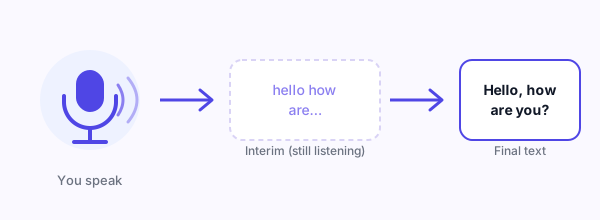
It uses the Web Speech API's speech recognition, built into supporting browsers. When you start, it asks for microphone permission, then listens continuously — showing interim words as it hears them and committing them to final text once it's confident, so you see live feedback that firms up as you go. You can pick the recognition language, and it appends new speech to whatever is already in the box, so you can dictate in stretches.
Assumptions and behaviour
- Continuous dictation with live interim results — partial words show as you speak and settle into final text.
- Language is selectable, so recognition matches how you're speaking.
- New dictation is appended to the existing text rather than replacing it.
- It needs microphone permission, which your browser will prompt for the first time. Want a word count once you're done dictating? Paste the result into the Word & Character Counter.
Limitations and how your audio is handled
- This is the one tool here that isn't purely on-device. Browser speech recognition typically sends your audio to the browser vendor's cloud service to be transcribed (Chrome, for example, processes it via Google's servers). So unlike our other tools, your spoken audio may leave your device, and an internet connection is required. Don't dictate anything highly sensitive.
- Browser support is limited. It works best in Chrome and Edge; Firefox and Safari have little or no support, and the tool will tell you if your browser can't do it.
- Accuracy depends on conditions — accent, background noise, microphone quality and clarity of speech all affect the result, and punctuation isn't added automatically.
- If microphone permission is denied, transcription can't run.
Privacy
Be aware this tool differs from the rest of the site: to transcribe speech, the browser's recognition service usually uploads your audio to its vendor (e.g. Google in Chrome). The text stays in your browser, but the audio may be processed in the cloud. Avoid dictating confidential information.

 Get FreeMyTask as an app